konapod
Kona Pod - A Hyundai Kona EV Vehicle Monitor
Vehicle Monitoring with Secure and Private Solid Pod Storage









KonaPod monitors your Hyundai Kona EV: live vehicle status from the Bluelink API, a logbook for recording charges and drives, battery history charts, and driving efficiency statistics. All data is stored encrypted in your own personal Data Vault on a Solid server in the cloud, where everything stays within the Pod under your control. The app is supported by Togaware and implemented by Graham Williams pair coding with Claude Code using Flutter’s SolidUI package for cross platform development.
Solid Pods are a new approach to handling your personal data on the World Wide Web and is the latest innovation from the inventor of the WWW, Sir Tim Berners-Lee. Obtain a Pod for yourself on any Solid server and link it to your app.
We make this project available for free so if you appreciate the app then please show some ❤️ and tap on the star at GitHub to support our work. See the AU Solid Community showcase for many more apps using the Solid ecosystem.
The latest version of the app can be run online at konapod.solidcommunity.au with no installation required though requiring a Bluelink login, or the app can be downloaded and installed for your platform from the Solid Community AU repository:
- Web solidcommunity;
- Android aab or apk;
- GNU/Linux deb or snap or zip;
- macOS dmg or zip;
- Windows exe or zip.
Installation details are available for all platforms.
Contributions are welcome. Visit github to submit an issue or, even better, fork the repository yourself, update the code, and submit a Pull Request. The app is implemented in Flutter using solidui. Thanks.
Introduction
KonaPod is a desktop and mobile app for Hyundai and Kia EV owners (currently for Australia / NZ but please send in PRs for other regions). It connects to the Hyundai Bluelink API to fetch live vehicle status (battery charge, range, odometer, climate, tyre pressures, door locks) and saves snapshots to your Solid Pod so the data is always yours. A logbook lets you record every charge and drive with start/end readings, charging details, and notes. Battery history and driving efficiency charts are built from the accumulated log.
The Bluelink connection runs via a small Python helper script
(bluelink_fetch.py) that uses the open-source
hyundai-kia-connect-api
library. The required setup takes about two minutes on a fresh install.
Features
- Login with your Bluelink email, password & PIN
- Auto login on relaunch — no need to re-enter Bluelink credentials
- Demo mode — test the UI without real credentials
- Dashboard showing:
- Vehicle nickname, model, year, colour & fuel type badge
- Lock status, engine status, charging status
- Battery level + range bar (EV/PHEV)
- Fuel level + range bar (ICE/HEV)
- Door, bonnet & boot open/close
- Defrost status
- Tyre pressure (all 4 corners, in kPa)
- External temperature
- Odometer reading
- GPS coordinates
- Full VIN & vehicle details
- Last updated timestamp
- Pull-to-refresh and refresh button
- Sign out
Quick start
- Install the Python library — see Bluelink setup below. This is required for live vehicle data.
- Log in to your Solid Pod — tap the pod login button in the app bar and authenticate with your Pod provider.
- Enter Bluelink credentials — go to Settings and enter your Hyundai Bluelink email, password, and PIN. Tap Save Credentials.
- Test the connection — tap Test Connection in Settings. A step-by-step diagnostic shows exactly what’s working and what needs attention.
- Fetch live data — tap the cloud refresh button in the app bar to pull the latest vehicle status from Bluelink and save it to your Pod.
Bluelink setup
The app delegates all Hyundai API calls to a Python script
(bluelink_fetch.py) that must be placed next to the app binary. The script
requires the hyundai_kia_connect_api Python library.
1. Install Python 3
Most Linux and macOS systems already have Python 3. Check with:
python3 --version
If it is missing on Ubuntu/Debian:
sudo apt install python3 python3-pip
2. Install hyundai-kia-connect-api
Option A — simplest (recommended):
pip install hyundai-kia-connect-api --break-system-packages
The --break-system-packages flag is required on Ubuntu 23.04+ because the
system pip blocks global installs by default. It is safe to use here — this
library has no effect on system tools.
Option B — virtual environment:
If you prefer to keep the library isolated:
python3 -m venv ~/.local/share/konapod/venv
~/.local/share/konapod/venv/bin/pip install hyundai-kia-connect-api
KonaPod will find and use this venv automatically — no further configuration needed. The app searches the following locations in order:
~/.local/share/konapod/venv/bin/python
~/.konapod-venv/bin/python
<app binary dir>/venv/bin/python
python3   (system)
python    (system)
3. Place bluelink_fetch.py next to the app binary
The script ships alongside the installer. If it is missing, copy it from the
repository into the same directory as the konapod binary:
# Find where the binary lives:
which konapod

# Copy the script there (example):
cp bluelink_fetch.py /usr/local/bin/
4. Verify with Test Connection
Open Settings → Test Connection. The diagnostic dialog checks each prerequisite in turn and shows a fix command if anything is missing.
Keyring issues on a fresh Linux install
The app stores Bluelink credentials in the system keyring (libsecret). On a
fresh Ubuntu install the keyring may not be unlocked at startup, which
prevents credentials from being read and causes a KeyringLocked error.
Install and open Seahorse to create and unlock the default keyring:
sudo apt install seahorse
seahorse
In Seahorse: File → New → Password Keyring → name it Login → set a
blank password (or your login password). After that the keyring will unlock
automatically when you log in to the desktop.
🔌🚗 Showcase 🌳🌞
Under settings you can specify your username, password and pin to access your Bluelink account. This is necessary to be able to use this app. Currently only AU/NZ are supported but we welcome pull requests to extend to other jurisdications.
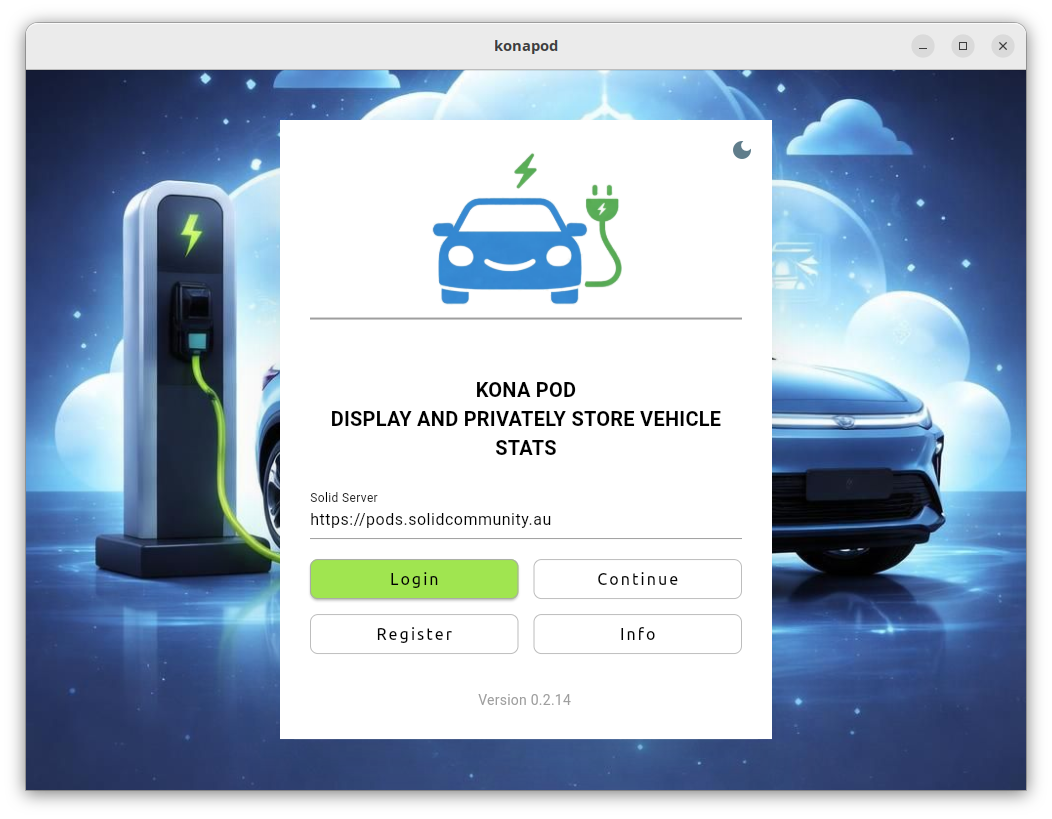
Login Screen - Here you can connect to your historic data you have stored securely and privately on your Solid Pod.
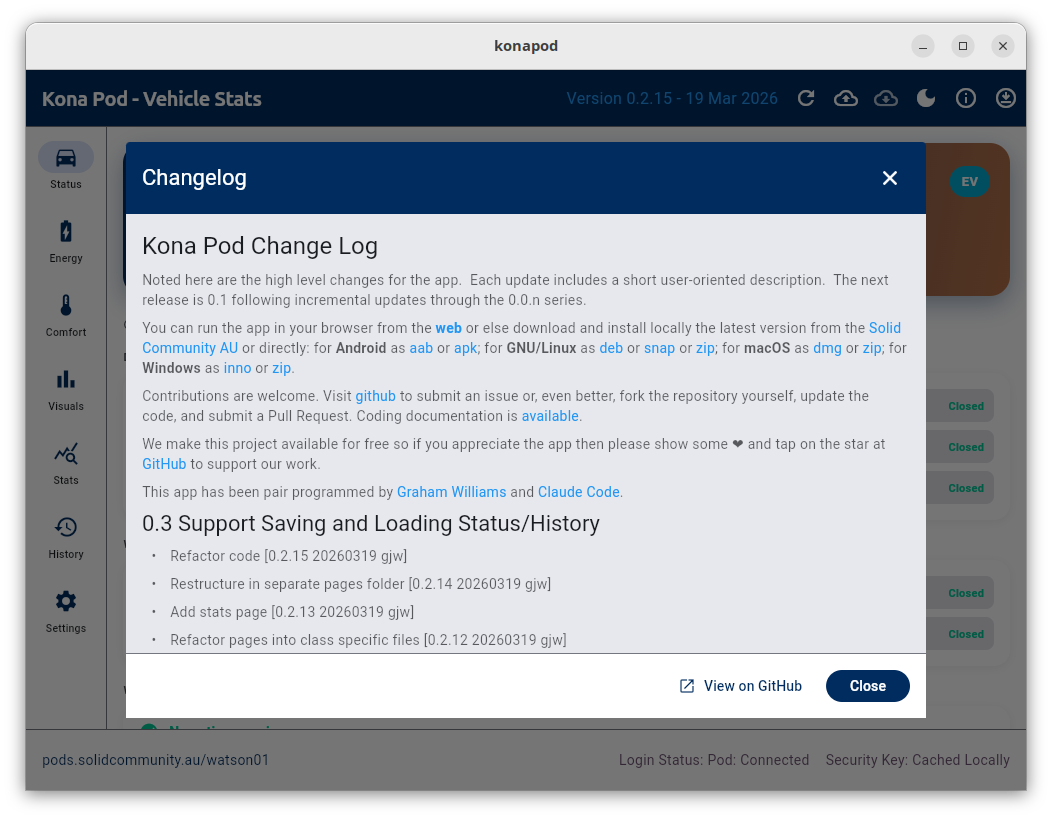
Changelog Screen - Tap the Version string to get the latest changes for the app.
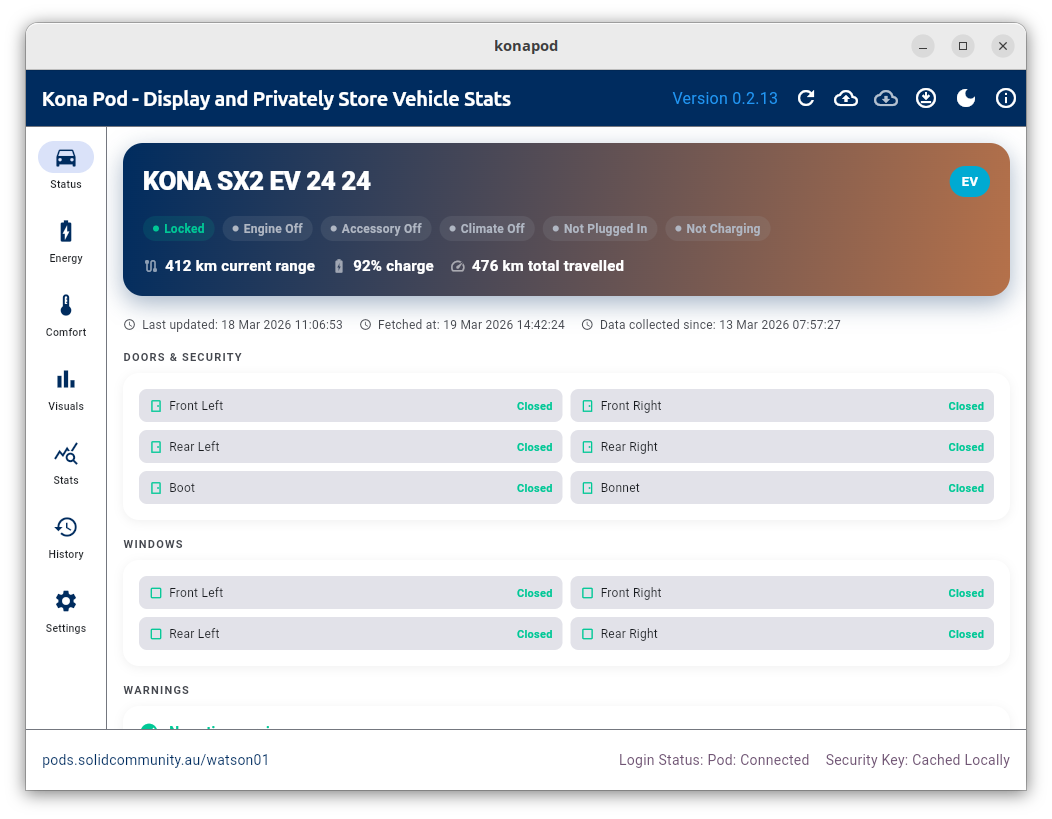
Status Page - The basic home page reports some of the key information of interest to the driver.
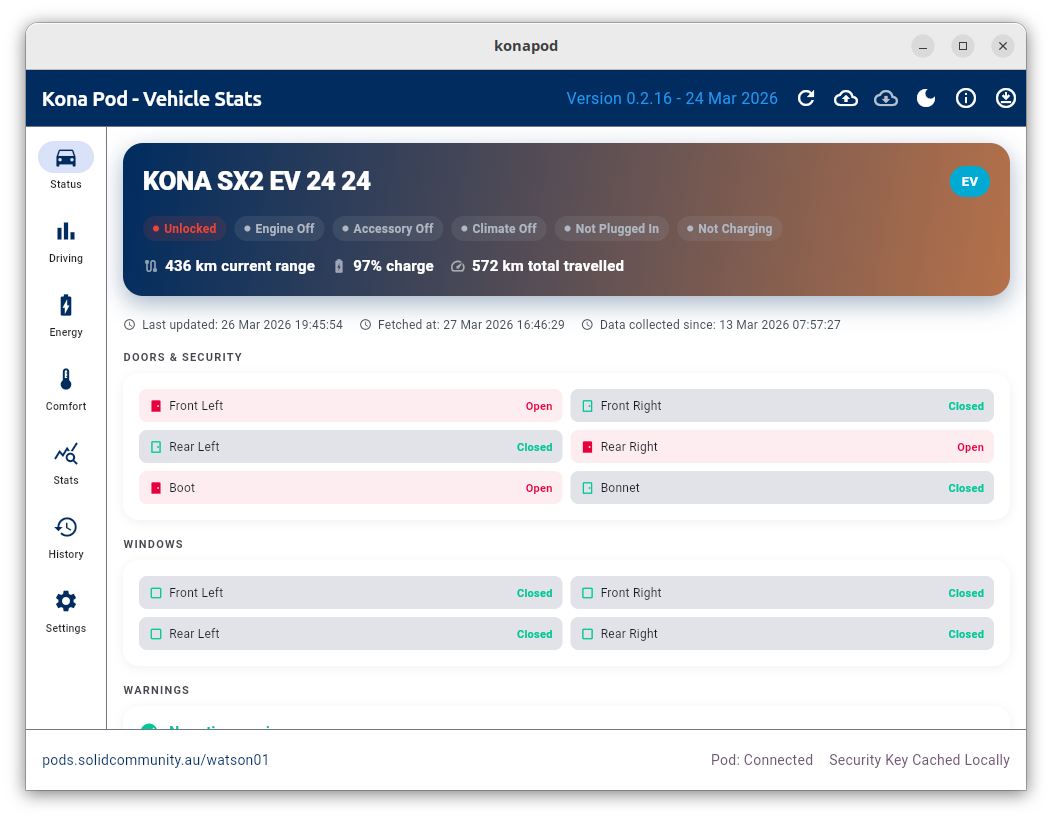
Status Page - Here we see some doors are open as well as the boot.
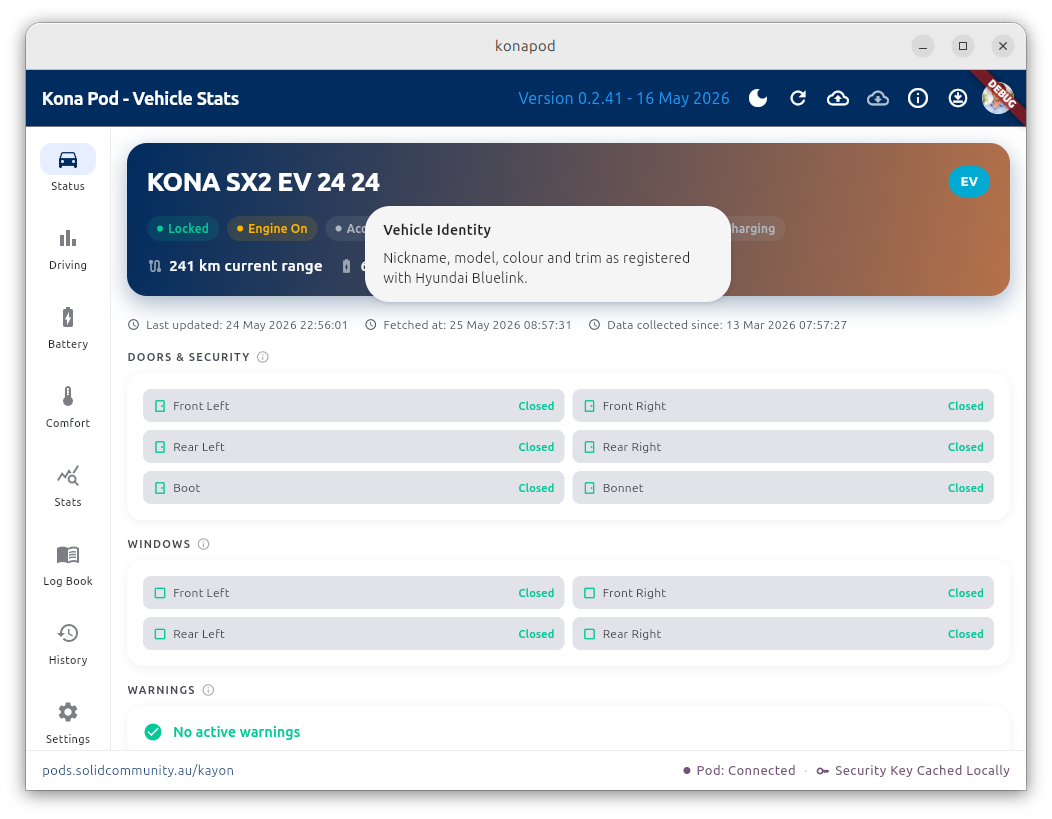
Here we see the car’s engine is on.
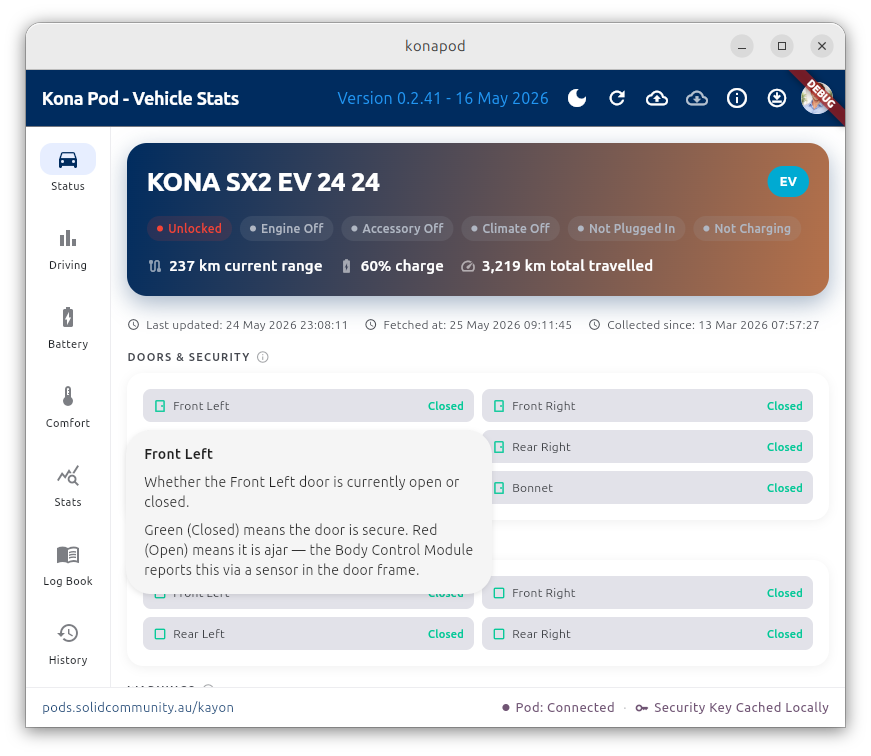
It’s useful to check if you’ve forgotten to lock your car.
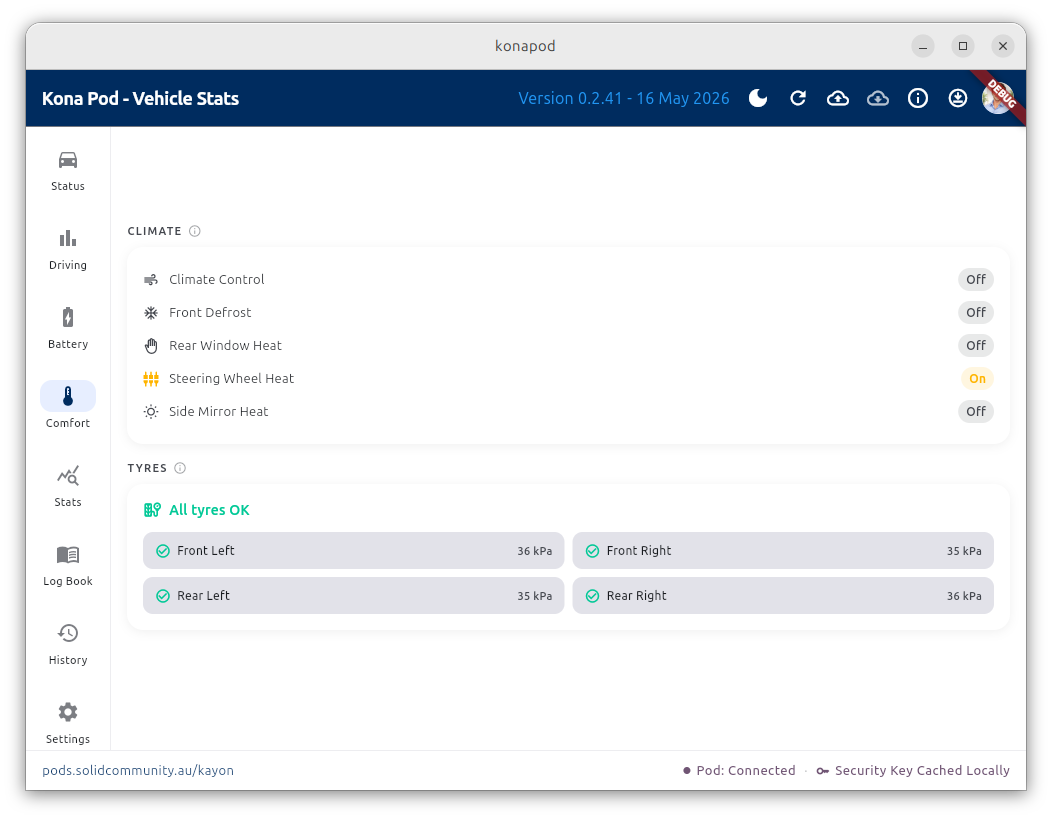
Here the current tyre pressures are reported. This reading is only available while the car is being driven.
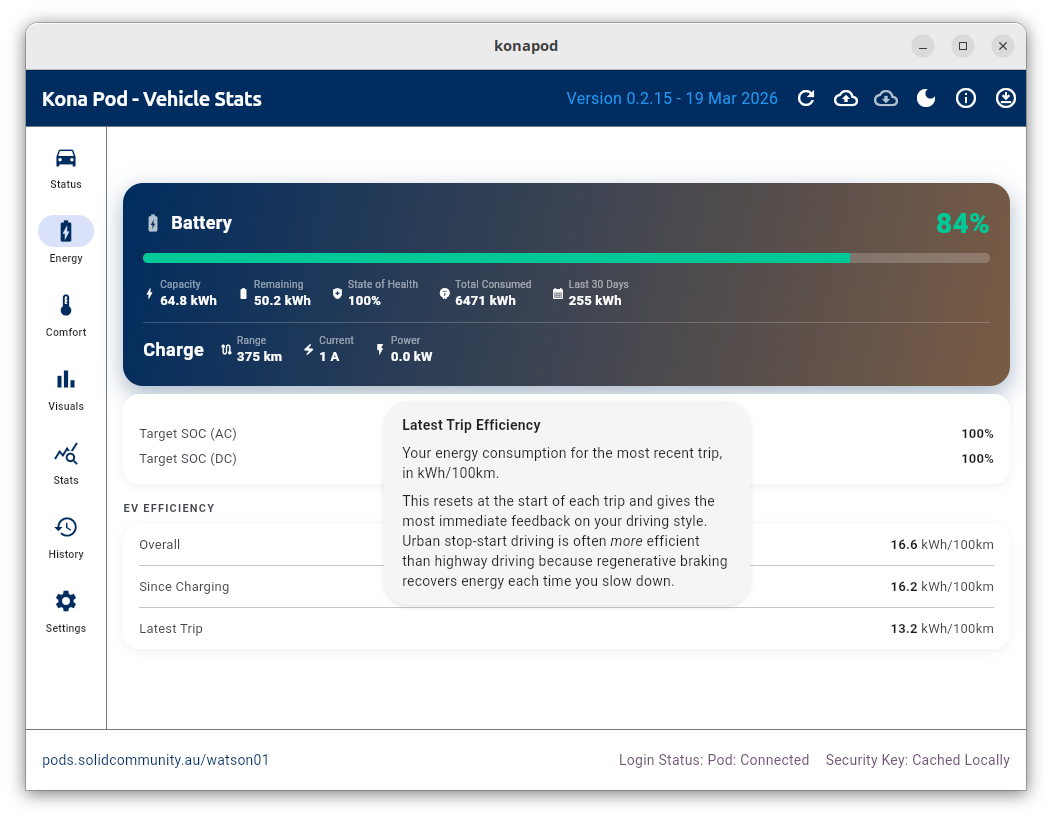
Energy Page - The status of the battery and other energy related statistics are presented here.
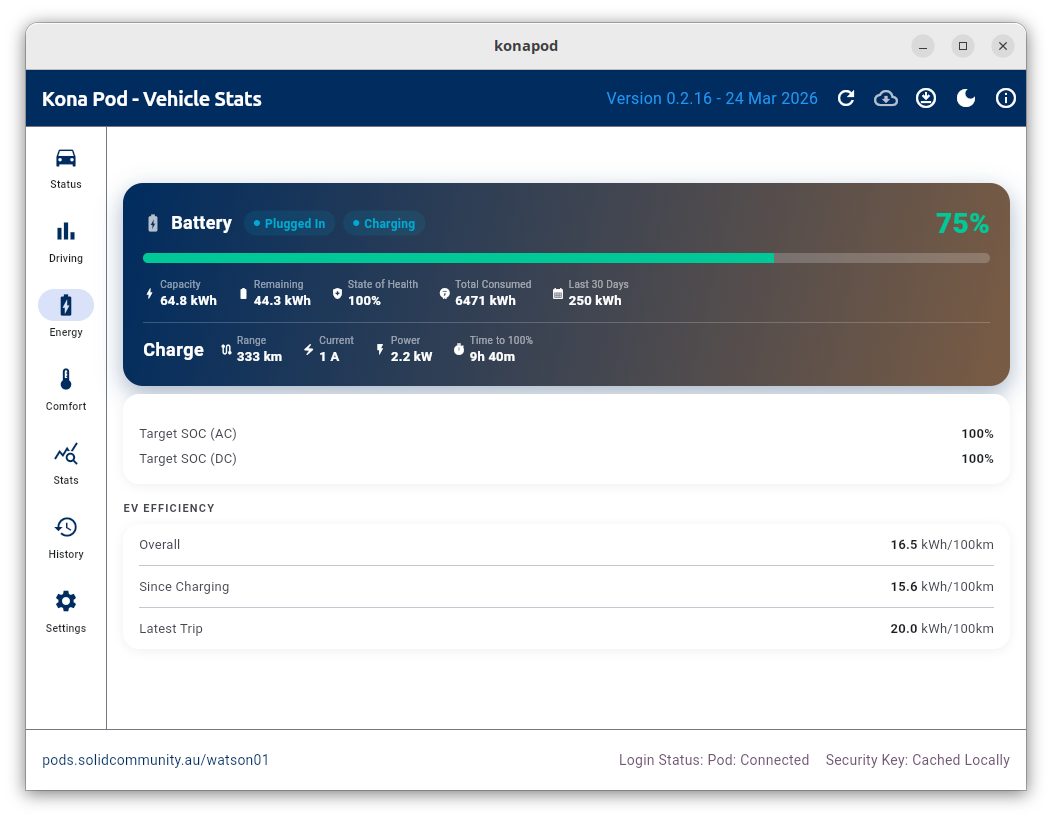
Energy Page while Charging - Here we see a charger is plugged in and the vehicle is charging at 2.2kW (plugged into the normal home 240V supply) with 9 hours and 40 minutes to go to 100%. Currently at 75% charge and 333km range.
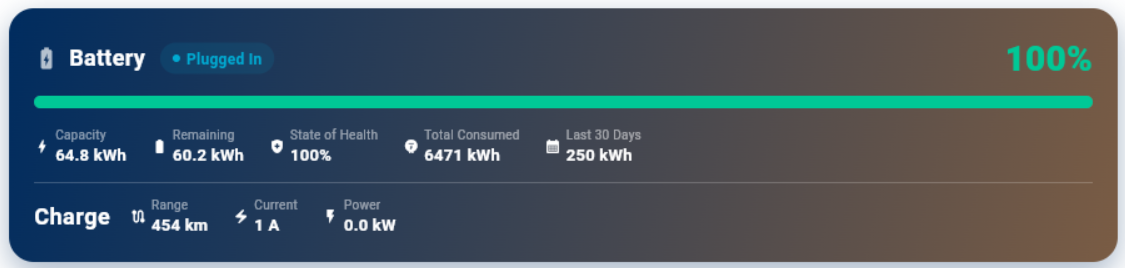
Energy Page Plugged In - The plugged status remains Plugged In and and
the Charging status disapers after charging has reached its set target
(100% here though recommended up to 80% day-to-day as set with the
Target SOC) and so the vehicle is no longer charging.
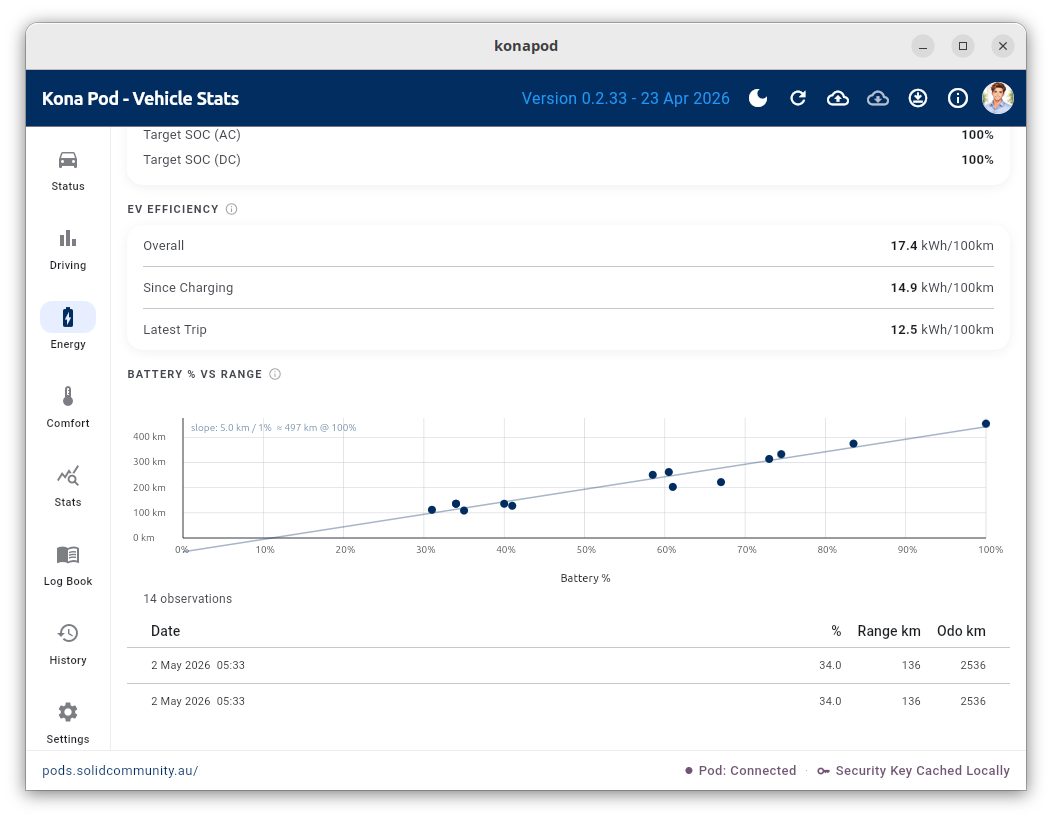
The Engergy Page also shows the reported battery percentage and km range. I understand these are calculated estimates based on recent charging levels.
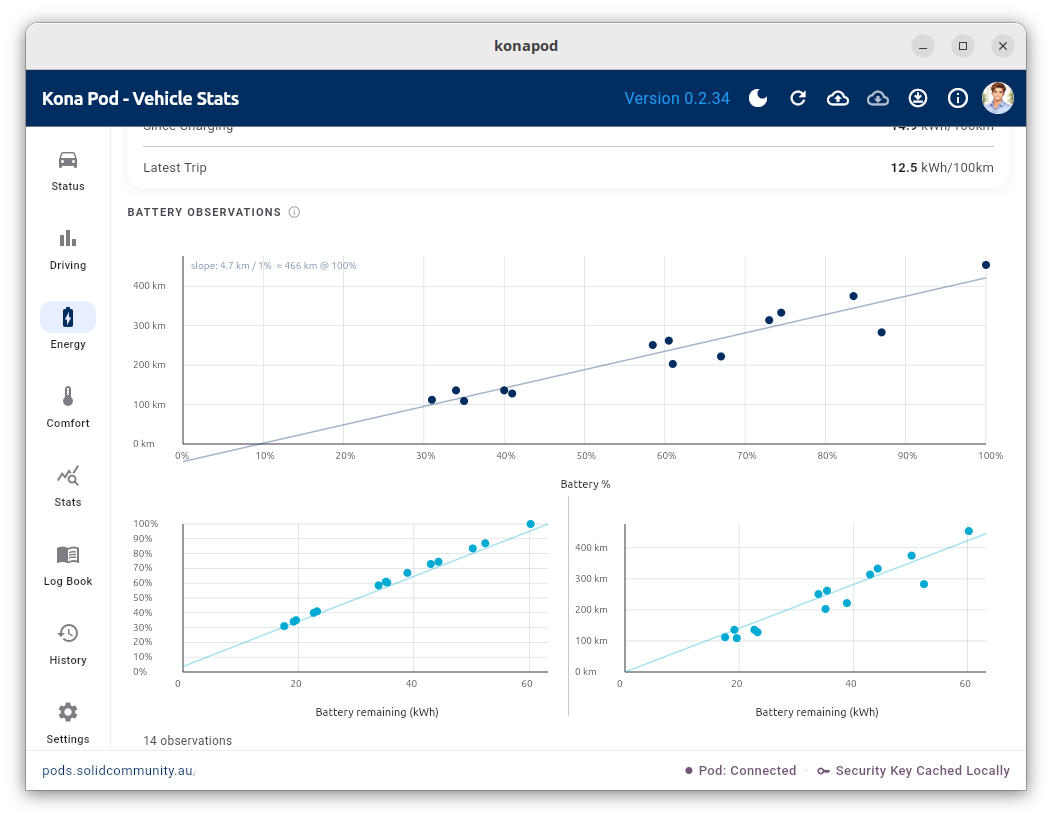
We can also plot the percentage against the remaining kWh to notice the linear relationship, confirming that the percentage is simply the percentage of battery charge, as expected. The kWh versus range remaining is then the same plot as the percentage charge versus distance or range remaining.
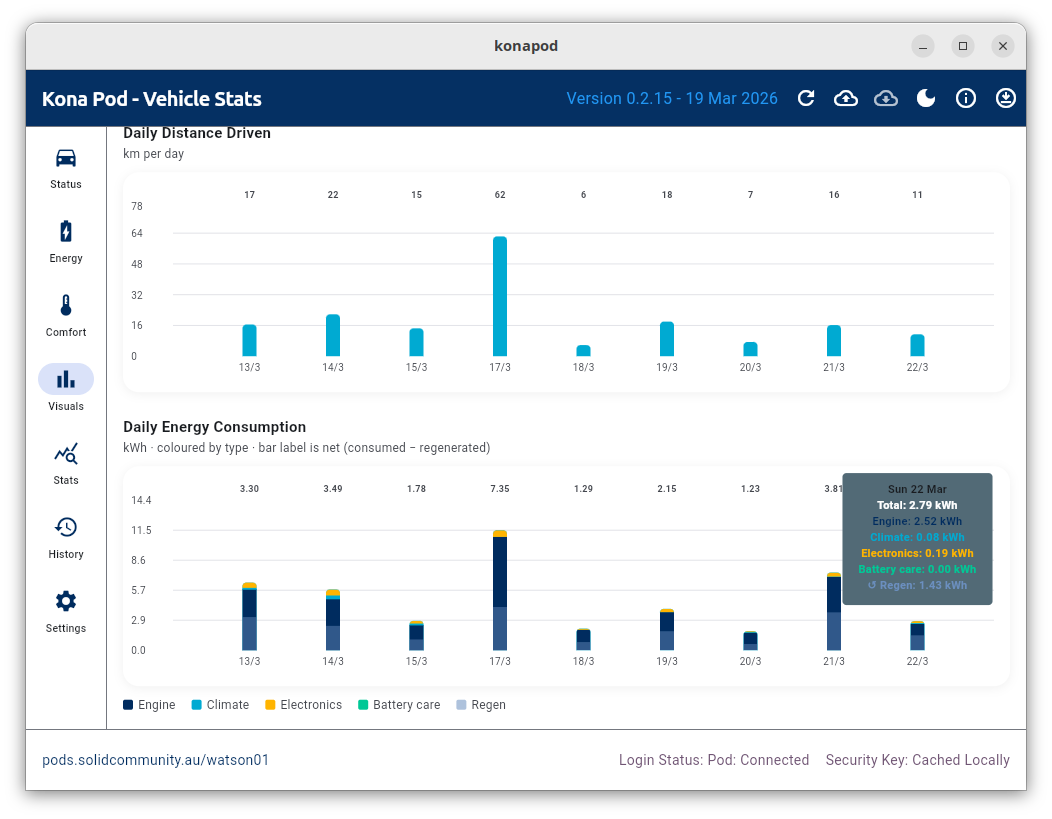
Visuals Page - Here we explore visually some of the vehicle performace stats. The tooltip shows on this particular day the car regenerated about half of the used power through braking, using iPedal that day.
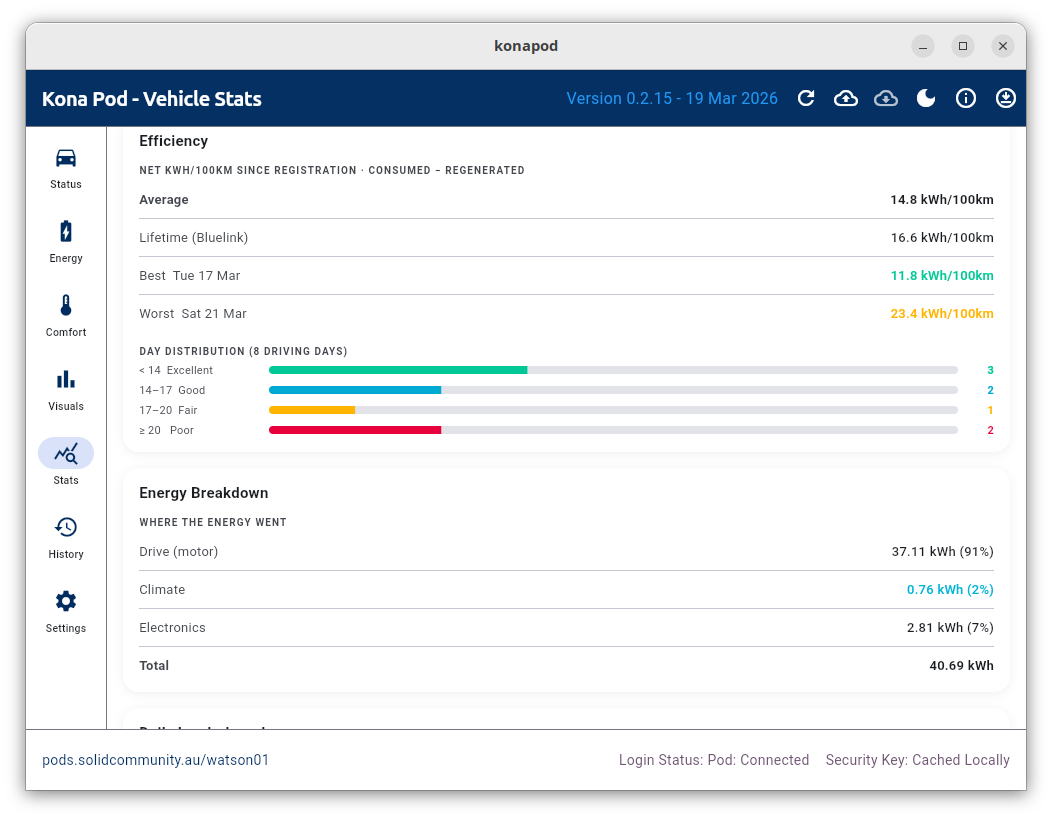
Stats Page - Various statistics about your vehicle’s performance.
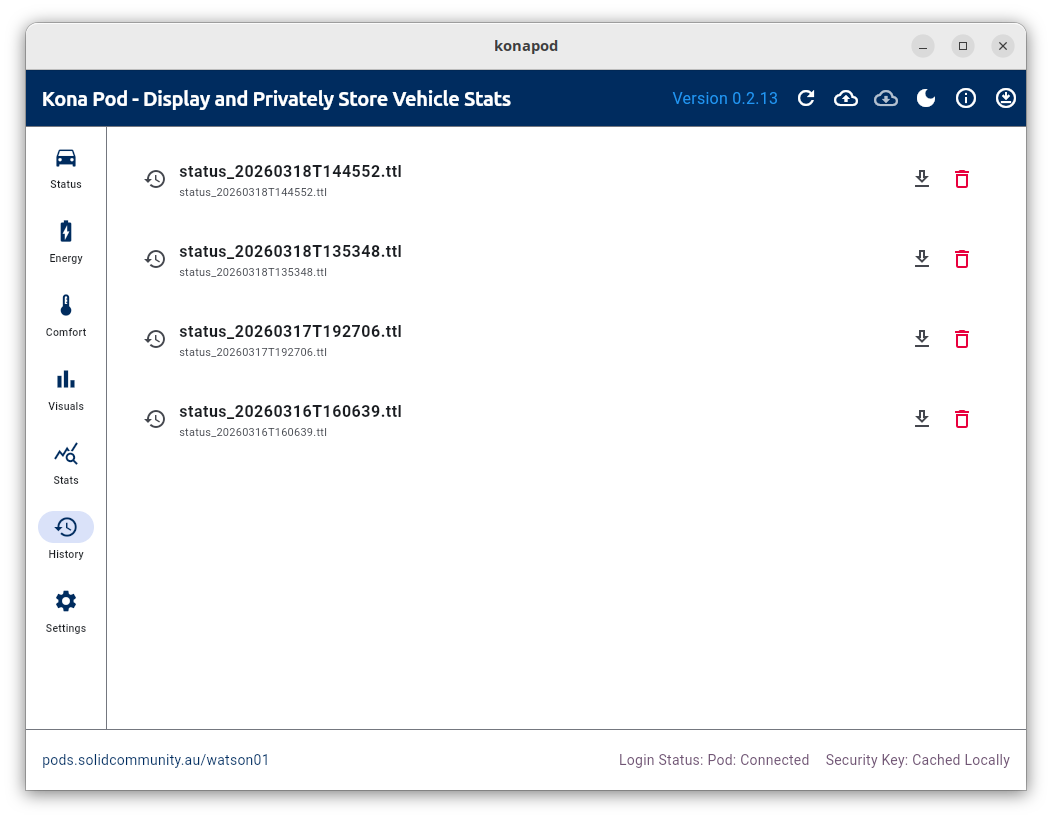
History Page - This data is stored securely and privately on your Solid Pod. Tap the down arrow to load any dataset into the app as the analysed/displayed dataset (replacing the data downloaded from your vehicle).
Setup to Build for Yourself
Prerequisites
- Flutter 3.x+ installed
flutter doctorpassing for your target platform
Install
git clone git@github.com:gjwgit/konapod.git
cd konapod
flutter pub get
flutter run
⚠️ Important Notes
Unofficial API
The Bluelink Australia API is not officially published by Hyundai. This app uses endpoints reverse-engineered by the community:
bluelink --region Australia --brand Hyundai \
         --username FOO --password BAR --pin 1234 \
         info --json infos.json
Timezone Issue
Note that the API returns a “driving date” as a string like
“20260403”, and the code uses strptime() to create a naive datetime
at midnight with no timezone info. The Bluelink server aggregates
daily statistics by UTC day boundaries. So driving done before 11am
AEDT or 10am AEST (= midnight UTC) on April 4th, for example, gets
bucketed into April 3rd’s stats, and the date label
says 20260403. This as a known Bluelink API limitation. The root cause
is server-side and not something the client library can fully fix.
Stamp Mechanism
Hyundai’s AU API requires a rotating “stamp” header.
This app fetches stamps from the community stamp server:
https://raw.githubusercontent.com/neoPix/bluelinky-stamps/master/hyundai-{appId}.v2.json
If the stamp server is unavailable, some API calls may fail.
Rate Limits
Avoid refreshing too frequently — over-polling can drain your car’s 12V battery. The app uses cached status (latest known state) by default, which is safe. Force-refresh directly queries the car’s modem.
Android Network Config
Add to android/app/src/main/AndroidManifest.xml inside <application>:
android:usesCleartextTraffic="true"
android:networkSecurityConfig="@xml/network_security_config"
And create android/app/src/main/res/xml/network_security_config.xml:
<?xml version="1.0" encoding="utf-8"?>
<network-security-config>
    <domain-config cleartextTrafficPermitted="true">
        <domain includeSubdomains="true">au-apigw.ccs.hyundai.com.au</domain>
    </domain-config>
</network-security-config>
iOS
Add to ios/Runner/Info.plist:
<key>NSAppTransportSecurity</key>
<dict>
    <key>NSAllowsArbitraryLoads</key>
    <true/>
</dict>
The six screens
A left-hand navigation rail gives you:
Status
Live vehicle status fetched from Bluelink: battery percentage and estimated range, climate state, door and window locks, tyre pressures, and the last update time. Tap the cloud button in the app bar to refresh.
Driving
Driving efficiency statistics calculated from the logbook: consumption (kWh/100 km), average speed, and trip breakdowns.
Battery
Battery history chart built from accumulated logbook readings. Shows state of charge over time and highlights charge events.
Comfort
Climate, seat heating/cooling, and other comfort-related readings from the last Bluelink snapshot.
Log Book
The main record of every charge and drive. Each entry captures start and end vehicle readings (odometer, battery %, remaining kWh, EV range) plus charging details (vendor, energy delivered, charge rate, duration, cost). Tap an entry to expand its details, or tap the edit icon to modify it.
Settings
Enter and save Bluelink credentials, run the connection diagnostic, and view setup instructions.
Adding and editing a log entry
Tap + in the Log Book screen to add a new entry. The edit form captures:
- Title — e.g. “Home charge”, “NRMA fast charge”, “Drive to Sydney”
- Date and time — defaults to now
- Location — optional address with geocode
- Start readings — odometer (km), battery (%), remaining (kWh), EV range (km)
- Charging session toggle — turn on to reveal charging detail fields
- End readings — same fields as start, plus a “From Bluelink” button that fills in the latest values from the last API fetch
- Charging details — vendor/network, energy delivered (kWh), charge rate (kW), duration (h and m), cost per kWh, total cost
- Notes — free text for anything else
Tap any existing entry to edit it. Drag the right handle to reorder entries. Swipe left to delete (with confirmation).
About info
Tap the info (ℹ) button in the top app bar at any time to see a brief about-the-app dialog with the version number and links to the repository.
Data and privacy
All vehicle snapshots and logbook entries are stored in your Solid Pod under
the konapod/ directory as Turtle (.ttl) and JSON files. Nothing about
your vehicle or driving ever leaves your Pod unless you explicitly export it.
Your Bluelink credentials (email, password, PIN) are stored only in the system keyring on your local device — they are never sent to the Pod or to any server other than the Hyundai Bluelink API during a live fetch.
Troubleshooting
Test Connection shows “Python + hyundai_kia_connect_api not found”.
Install the library: pip install hyundai-kia-connect-api --break-system-packages
or set up a venv at ~/.local/share/konapod/venv — see
Bluelink setup.
Test Connection shows “bluelink_fetch.py not found”. The script must sit next to the app binary. Copy it from the repository to the path shown in the error message.
KeyringLocked error on startup. The system keyring is not unlocked. Install Seahorse and unlock the default keyring — see Keyring issues. The app will continue to load; enter credentials manually in Settings.
“Login refused: the password has expired and must be reset.” Hyundai expires a Bluelink password after about six months, so a login that worked for months stops without anything having changed at your end. Open the Bluelink app on your phone, which will prompt for a new password, set one, then update it in Settings here and tap Save Credentials.
Other wording after “Login refused” — terms of service to accept, email to verify, account blocked — means the same thing: the account authenticated, but Hyundai wants something done in the Bluelink app before it will hand this app a token. Do what it asks there, then retry.
“Timed out after 90s” from Bluelink. The Hyundai API is slow or temporarily unavailable. Try again after a few minutes. If it consistently times out, check that your Bluelink account is active in the Hyundai app on your phone.
No data on the Status screen after a successful fetch. Make sure you are logged in to your Solid Pod (status bar at the bottom shows “Logged In”) and that the security key is cached. Tap the key indicator if it shows as missing.
License
GNU General Public License v3. See LICENSE or
https://opensource.org/license/gpl-3-0.
Copyright (C) 2026, Togaware Pty Ltd.